Phaser + AI 实战:制作30秒接金币H5游戏
从一个HTML页面到可玩的接金币游戏:键盘与触摸控制、生成与回收、计分倒计时、结束重开,附源码和在线试玩。
Phaser 3.90.0;现代桌面与移动浏览器 · 约60–90分钟;首次使用引擎请额外预留安装时间
使用真实Phaser运行时检查计分、结束与重开,并检查桌面键盘及移动端触摸输入;不代表小游戏平台适配。
下载完整源码与中文说明打开成品试玩01 · 成品与文件说明
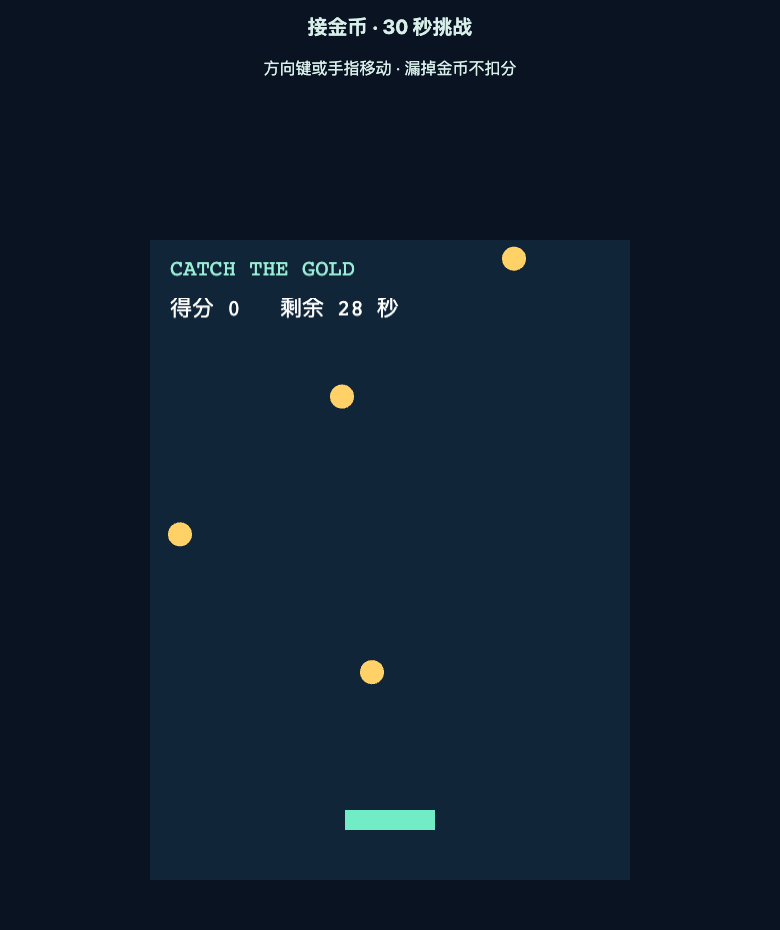
这局游戏持续30秒:底部绿色托盘左右移动接住金币,每个金币加1分,漏掉不扣分。倒计时结束显示得分,点击文字重新开始。图形全部由代码绘制,不需要购买素材。 本例固定Phaser 3.90.0,以避免不同大版本API混用。下载包包含index.html、game.js、phaser.min.js和Phaser的MIT许可。Phaser官方入门课程是平台跳跃游戏;这里是本站独立编写的接金币项目,采用中文解释。
02 · 启动本地静态服务器
解压后进入phaser-catch目录。安装Python 3的电脑可以执行下面命令,再用浏览器访问http://localhost:8080。看到标题和游戏画布就算启动成功;端口占用时把8080换成8081。 也可以使用编辑器的静态预览扩展。不要把本地文件直接拖进浏览器后,就把所有资源加载问题都归因于引擎。线上试玩使用同一份源码。
cd phaser-catch
python3 -m http.server 8080
03 · HTML负责加载,Scene负责游戏
index.html先加载phaser.min.js,再加载game.js,顺序不能反过来。容器id必须与Phaser.Game的parent一致。480×640是游戏内部逻辑尺寸,Scale.FIT让画布按比例适配外部容器,横向坐标仍使用逻辑像素。 游戏只使用一个Scene。create负责创建初始物体与状态,update负责每帧移动和规则。每局调用scene.restart时会重建这个Scene,因此计分、倒计时和数组都必须在create内初始化。
<!doctype html><html lang="zh-CN"><meta charset="utf-8"><meta name="viewport" content="width=device-width,initial-scale=1"><meta name="robots" content="noindex"><title>接金币 · AI门道实战</title><style>body{margin:0;background:#091322;color:#d8eee8;font-family:system-ui;text-align:center}h1{font-size:20px}#game{max-width:480px;margin:auto}canvas{display:block}a{color:#9be4cf}</style><h1>接金币 · 30 秒挑战</h1><p>方向键或手指移动 · 漏掉金币不扣分</p><div id="game"></div><p><a href="/learn/web-game-ai-workflow">返回完整教程</a></p><script src="phaser.min.js"></script><script src="game.js"></script></html>
04 · 完整game.js
下面代码与下载包相同。先复制整份运行,再按后续章节理解并逐步修改。代码使用矩形与圆形GameObject;没有开物理世界,碰撞由尺寸范围计算完成。
/* AI门道原创示例,MIT。Phaser 3.90.0 */
class CatchGame extends Phaser.Scene {
  constructor() { super('catch'); }
  create() {
    this.score = 0;
    this.remaining = 30;
    this.finished = false;
    this.spawnLeft = 0.6;
    this.coins = [];
    this.add.rectangle(240, 320, 480, 640, 0x102538);
    this.add.text(20, 18, 'CATCH THE GOLD', { fontSize: '22px', color: '#9befd7' });
    this.hud = this.add.text(20, 58, '', { fontSize: '22px' });
    this.player = this.add.rectangle(240, 580, 90, 20, 0x72ecc4);
    this.cursors = this.input.keyboard.createCursorKeys();
    this.paintHud();
  }
  paintHud() { this.hud.setText(`得分 ${this.score}   剩余 ${Math.ceil(this.remaining)} 秒`); }
  endGame() {
    if (this.finished) return;
    this.finished = true;
    this.remaining = 0;
    this.paintHud();
    this.add.rectangle(240, 300, 390, 140, 0x07131f, 0.95);
    const restart = this.add.text(240, 300, `本局 ${this.score} 分\n点击重新开始`, {
      fontSize: '28px', color: '#fff1b4', align: 'center', lineSpacing: 16,
    }).setOrigin(0.5).setInteractive({ useHandCursor: true });
    restart.once('pointerdown', () => this.scene.restart());
  }
  update(_time, delta) {
    if (this.finished) return;
    const dt = Math.min(delta / 1000, 0.05);
    this.remaining = Math.max(0, this.remaining - dt);
    if (this.remaining === 0) { this.endGame(); return; }
    const pointer = this.input.activePointer;
    if (pointer.isDown) this.player.x = pointer.x;
    else this.player.x += ((this.cursors.right.isDown ? 1 : 0) - (this.cursors.left.isDown ? 1 : 0)) * 360 * dt;
    this.player.x = Phaser.Math.Clamp(this.player.x, 45, 435);
    this.spawnLeft -= dt;
    if (this.spawnLeft <= 0) {
      this.coins.push(this.add.circle(Phaser.Math.Between(20, 460), -12, 12, 0xffd166));
      this.spawnLeft += 0.6;
    }
    for (let i = this.coins.length - 1; i >= 0; i--) {
      const coin = this.coins[i];
      coin.y += 230 * dt;
      const caught = Math.abs(coin.x - this.player.x) <= 57 && Math.abs(coin.y - this.player.y) <= 22;
      if (caught) this.score++;
      if (caught || coin.y > 665) { coin.destroy(); this.coins.splice(i, 1); }
    }
    this.paintHud();
  }
}
window.workshopGame = new Phaser.Game({
  type: Phaser.AUTO, parent: 'game', width: 480, height: 640,
  backgroundColor: '#102538', scene: CatchGame,
  scale: { mode: Phaser.Scale.FIT, autoCenter: Phaser.Scale.CENTER_BOTH },
});
05 · 同时处理键盘和触摸
键盘用左右键决定-1、0或1,再乘360像素/秒。触摸或按住鼠标时,让托盘跟随pointer.x。Phaser输入已经转换到画布逻辑坐标,不应再次除以CSS缩放比。 托盘半宽45,所以中心x只能在45到435之间。验证时将手指拖出画布边缘,托盘仍不应完全离开画面。若页面随手指滚动,先确认触摸发生在游戏画布上,且没有额外HTML遮挡它。
06 · 生成金币与安全回收
spawnLeft归零就生成一个半径12的金币,x位于20至460,y从-12开始,每秒下落230像素。数组保存当前所有金币;捕获或离屏时既destroy画面对象,也splice移除数组项。 只destroy但不清空数组,会留下失效引用;只splice但不destroy,则可能留下看得见却不再更新的图形。循环从后向前遍历,避免删除时跳过相邻元素。 本例最大单次步进0.05秒,金币最多移动11.5像素,小于判定区域高度。这是当前速度下的简化方案;高速子弹需要扫掠检测或物理系统。
07 · 碰撞、计分与30秒规则
托盘半宽45、金币半径12,横向允许距离57;托盘半高10加金币半径12,纵向允许距离22。两个条件同时成立即计分并销毁金币,防止一颗币连续加分。 remaining每帧减少dt,归零后调用endGame。endGame先检查finished,保证结束界面只生成一次;结束后update直接返回。界面显示Math.ceil,最后不足1秒时显示1,避免提前显示0却仍能继续玩。 这里30秒是模拟时间:从后台切回时不会一次扣掉很长时间。若产品需要真实倒计时,应记录截止时间并处理失焦暂停策略。
08 · 让AI增加炸弹,而不是重写整个游戏
先备份game.js,再让AI增加一种新规则。把验收写清楚,可以发现模型只改了画面但没有改状态的问题。完成后同时测试金币、炸弹和结束重开,不只看AI给出的代码解释。
请基于这份Phaser 3.90.0 game.js增加红色炸弹,生成概率20%。接金币+1,接炸弹-3但最低0分;漏接不扣分。保持30秒结束与重开逻辑。请复用现有生成和回收流程,列出修改点,并给出金币与炸弹同帧接触、分数下限、连续重开三种验收步骤。不要使用Phaser 4 API。09 · 测试、部署与常见错误
至少测试:键盘到左右边界、触摸移动、一次命中只加一次分、金币离屏被清理、到时冻结、重开归零、连续重开5次速度不变。 Phaser is not defined:看Network里phaser.min.js是否200,并检查script顺序;空白画布:先看Console第一条错误;文字被裁切:检查是否改了逻辑分辨率却没改布局。 发布时将三个运行文件上传到同一静态目录,保留Phaser许可文件;通过HTTPS访问并检查所有文件200。此示例是H5网页游戏,不能直接当作微信小游戏包上传。